
The Whole CCNA Cheat Sheet (Everything, Mostly Painless)
All six CCNA 200-301 domains in one place, with diagrams, and written like a human wrote it. Free, obviously.
How to use this without losing your mind
This is the whole exam, compressed. It is not a substitute for actually building labs — it's what you skim the night before, or whenever a term walks past you like a stranger you're pretty sure you've met.
Six domains, roughly in blueprint order. If a term doesn't ring a bell, that's useful information: go build the lab, not just re-read the bullet.
Domain 1: Network Fundamentals (or, how do these boxes even talk)
Router = decides WHERE traffic goes (Layer 3). Switch = decides HOW traffic gets across one local network (Layer 2). A switch does not know what a subnet is and does not want to.
The OSI model has 7 layers; nobody uses all 7 in casual conversation, but everybody name-drops Layer 2 and Layer 3 like they're old friends. Learn those two cold, know the rest exist.
Straight-through cable connects unlike devices (PC to switch). Crossover connects like devices (switch to switch) — though most modern ports auto-detect and stopped caring years ago, the exam has not stopped caring.
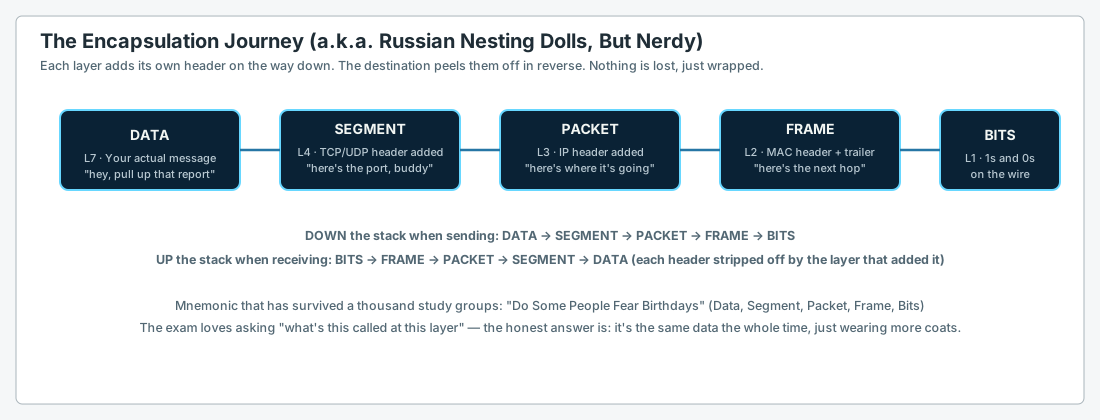
The encapsulation journey (this diagram will save you)
Mnemonic that has outlived several Cisco exam versions: 'Do Some People Fear Birthdays' — Data, Segment, Packet, Frame, Bits.
Every layer adds ITS OWN header on the way down. The destination strips them off in exactly the reverse order. It's the same data the whole trip, just wearing more coats.
IPv4 addressing, without the tears
Private ranges you will see forever: 10.0.0.0/8, 172.16.0.0/12, 192.168.0.0/16. If an exam question's address starts with one of these, it is NOT going to the actual internet directly.
169.254.x.x showing up on a host means DHCP failed and the OS gave up and made something up (APIPA). It is not a real address, it is a cry for help.
Full subnetting method lives in its own guide — see 'Subnetting Without Crying' if the concept still causes a physical reaction.
Domain 2: Network Access (VLANs and the drama therein)
STP port roots, fast
Root port: the ONE port on a non-root switch with the best path back to the root bridge. Every non-root switch has exactly one.
Designated port: the port on each SEGMENT that forwards toward that segment — normally the root bridge's ports are all designated.
Blocking: not broken, just polite. It's there for redundancy and steps up the instant something fails.
Domain 3: IP Connectivity (the router's whole personality)
Longest prefix match wins. Always. A /32 route beats a /24 beats a /0, regardless of which one was configured first or which protocol found it.
Administrative distance is the tiebreaker BETWEEN DIFFERENT SOURCES for the SAME prefix (directly connected beats static beats OSPF beats a default route from nowhere). It has nothing to do with which route is 'better' once one source already won on prefix length.
A floating static route is just a static route with a worse (higher) AD than your dynamic protocol, so it only shows up in the table when the dynamic route disappears. It's a backup that knows its place.
OSPF, the highlights reel
Neighbors must agree on: subnet, area number, hello/dead timers, and MTU — mismatch any of these and the adjacency just... doesn't. No error message yells at you, it just quietly fails.
Router ID is chosen from (in order): manually configured ID, highest loopback IP, highest active physical interface IP. Set it manually in real life; don't let the router improvise.
FHRP (HSRP/VRRP/GLBP) exists because a single default gateway is a single point of failure, and 'just don't let the router die' is not a real strategy.
Domain 4: IP Services (the unglamorous glue holding everything together)
QoS in one breath
Classify (figure out what kind of traffic this is) → Mark (label it) → Queue (decide who goes first) → Police or Shape (enforce the limit).
Policing drops or re-marks excess traffic immediately, no mercy, no delay. Shaping buffers the excess and sends it slightly late instead of dropping it — better for bursty stuff that can tolerate a little delay but hates loss.
Domain 5: Security Fundamentals (lock the doors)
AAA is three separate jobs: Authentication (who are you), Authorization (what are you allowed to do), Accounting (what did you actually do). Don't merge them in your head — they fail independently and the exam knows it.
ACLs are evaluated top-to-bottom, FIRST MATCH WINS, and there's an invisible 'deny everything else' at the very bottom of every ACL. An ACL with only deny statements blocks everything, including whatever you meant to allow.
Port security without a violation action configured just... security. Set the violation mode (protect/restrict/shutdown) or the feature isn't really doing its job.
Domain 6: Automation & Programmability (the new kid)
Controller-based networking flips the model: instead of configuring every device by hand, you tell the CONTROLLER what you want, and it pushes that intent to every device. Brain and hands, separated on purpose.
REST APIs mostly speak in verbs you already know: GET (read), POST (create), PUT (replace), PATCH (partially update), DELETE (remove). JSON is just how the data gets packaged for the trip.
Southbound = controller talking DOWN to devices. Northbound = controller talking UP to your applications/scripts. Mixing these two up on the exam is extremely common and extremely avoidable.
The night-before survival kit
Read every question twice. The exam is generous with distractor answers that are true statements about the WRONG topic.
If two answers both sound right, one of them is almost always solving a slightly different problem than the one being asked. Re-read the actual question stem.
You don't need to remember everything. You need to remember enough to know what to go verify with a show command — which is, coincidentally, also the entire job.
Want a printable copy?
This complete guide is also available as a professionally formatted PDF.
Download PDF ↓